

Release Announcement
Linux Lite 5.4 Final is now available for download and installation. This is a modest release which includes updates to the Help Manual - our extensive, easy to follow Linux Lite guide, an updated Papirus icon theme, new wallpapers and a host of bug fixes and enhancements for our target audience. If you're coming from Windows, you'll find this to be a solid, stable release that will help make your transition to a linux based operating system, user friendly.

Changes:
New 'Installing Software - From a Terminal using APT' section for the Help Manual:

Updated Papirus icon theme

10 new Wallpapers of which 6 are from our resident artist [member=5059]whateverthing[/member]

Plus many other tweaks and changes.
Window Theme: Adapta
Icon Theme: Papirus
Font: Roboto Regular
How do I know if my Windows PC has UEFI?
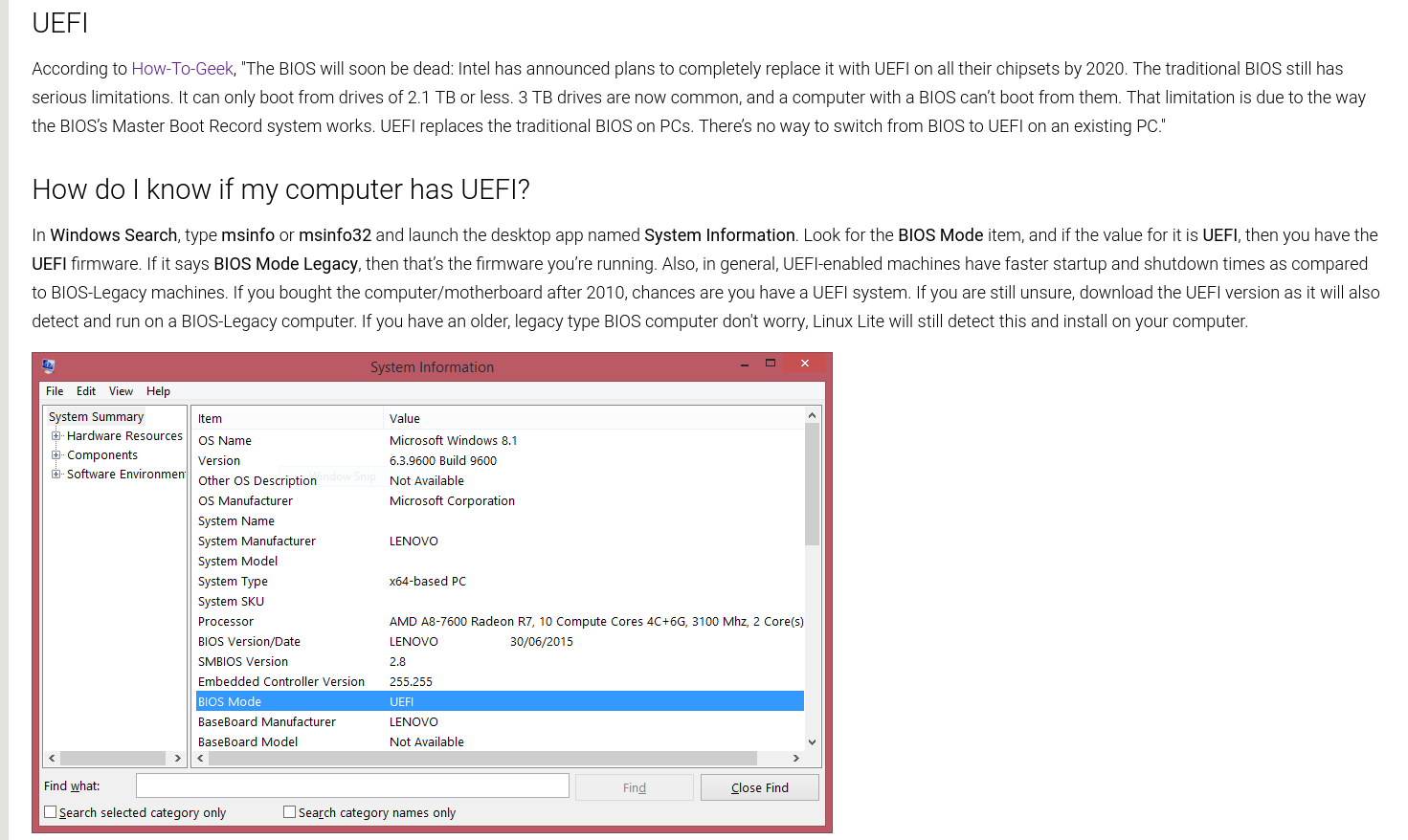
In Windows Search, type msinfo or msinfo32 and launch the desktop app named System Information. Look for the BIOS Mode item, and if the value for it is UEFI, then you have the UEFI firmware. If it says BIOS Mode Legacy, then that’s the firmware you’re running.
Secure Boot is supported, but unless you know exactly how to handle it, it is a P.I.T.A. at best so I am going to say...you must disable Secure Boot to enable stress free computing.
Some helpful snippets from the latest Help Manual:

UEFI Support link - https://www.linuxliteos.com/forums/uefi-secure-boot/
Details:
Kernel: 5.4.0-70 ( custom kernels also available via our Repository for versions 3.13 - 5.11 )
Firefox: 87.0
Thunderbird: 78.7.1
LibreOffice: 6.4.6.2
VLC: 3.0.9.2
Gimp: 2.10.18
Base: 20.04.2
Known Issues:
No prompt to eject Media at the end of the Legacy install, prompt is available at the end of the UEFI install.
Release Notes - not working on first installer slide.
Desktop icons - English support only.
Grub - holding shift down whilst booting in UEFI mode does not bring up the Grub menu (works in Legacy mode), waiting for Ubuntu fix.
Grub menu shows Linux Lite as 'Ubuntu'. After you install Linux Lite, you can change Grub to show 'Linux Lite':
- Open /etc/default/grub as Administrator.
- Comment out: GRUB_DISTRIBUTOR=`lsb_release -i -s 2> /dev/null || echo Debian` and leave GRUB_DISTRIBUTOR='Linux Lite' uncommented.
- Should look like:
GRUB_DISTRIBUTOR='Linux Lite'
#GRUB_DISTRIBUTOR=`lsb_release -i -s 2> /dev/null || echo Debian`
- sudo update-grub
You tell me.
Upgrading
There has been some tweaks to the Lite Upgrade code from Series 4.x. Most notably, the end dialogue has been simplified and will ask you to either Reboot, Shutdown or View Log. Continue Working is no longer viewed as a sensible option. Also, Lite Welcome will no longer be displayed after a Reboot. Just look at Lite Widget to see if you upgraded successfully to 5.4 or do:
cat /etc/llverin a Terminal, should return Linux Lite 5.4. Lastly, the upgrade log will now be stored in /var/log/lite-upgrade.log for those interested in the process. All of our code will function in the 'system space' and no longer in the 'user space'. Our overall improvements to Lite Upgrade should see people upgrading as quickly as ever with less bloat along with unnecessary dialogues and information.
> Menu, Favorites, Install Updates (you must reboot if asked to, otherwise continue to the next step)
> Set a Restore Point - Menu, System, Timeshift
> Menu, Settings, Lite Upgrade
> Reboot
PLEASE NOTE: If you do not have Menu, Settings, Lite Upgrade do:
sudo apt-get install --reinstall lite-upgrade-series5and, or:
rm -rf ~/.local/share/applications/lite-upgrade.desktopthen try Menu, Settings, Lite Upgrade again.
Having problems upgrading? First thing to do is open a terminal, and make sure you have the latest version of Lite Upgrade.
apt policy lite-upgrade-series5should return:
  Installed: 5.0-0030-linuxlite
  Candidate: 5.0-0030-linuxlite
If you've ran Install Updates and still don't have this version or greater you can either - wait 24 hours, or change to the default Linux Lite repository in Lite Sources.
Lite Upgrade - What it will do:
- New Lite Help Manual
- New Lite Upgrade
- New Lite Welcome
- New Lite Themes
- New Wallpapers
- Add hashalot, a program for giving sha256 sum output
Lite Upgrade - What it won't do:
- nothing to exclude
Manual removal of Adobe Flash:
sudo apt-get remove flashplugin-installerThen perhaps use a apt-mark hold to stop it reinstalling:
sudo apt-mark hold flashplugin-installerFor any help on removing/adding any of the above, please place a Post.
There is no upgrade path to or from RC releases.
There is no upgrade path from Series 2, 3 or 4 ( 2.0, 2.2, 2.4, 2.6, 2.8 | 3.0, 3.2, 3.4, 3.6, 3.8 | 4.0, 4.2, 4.4, 4.6, 4.8 ) to Series 5.
Downloads:
HTTPS:
Download 64bit from here - Linux Lite 5.4 Final 64bit
MD5SUM: 5b403da316c352ef44c12d3d10331985
SHA256: 214f99e253b367674c0ae6e6f72b5a1b5a5415e9cb9fabb9d95141a5ea945702
Size: 1.4Gb (DVD, USB)
TORRENT: (Fastest way to download the RC)
64bit Torrent from here - linux-lite-5.4-64bit.iso.torrent
Hash: 043106011b67f0280270c6b9ef105032f23e72eb
Size: 1.4Gb (DVD, USB)
International Mirrors (city specific) - https://www.linuxliteos.com/mirrors.php (wait for page to load, some mirrors may still be syncing with us)
Live USB/DVD/VirtualBox/Vmware:
Login is automatic, no credentials are required. The image can be written to a 2gb or larger USB stick, or a writable DVD. Alternatively, you can use the dd command: sudo dd if=linux-lite-5.4-64bit.iso of=/dev/sdx bs=4M where 'x' is the letter of your usb stick. In linux to find out the letter of your usb stick, open a terminal and type: df -h It is usually listed as 'media' or similar. Please see the built in Help Manual if you require a more detailed explanation of this procedure.
A good, simple point and click USB ISO burner is https://www.balena.io/etcher/ or https://rufus.ie/
In our testing, Etcher and Rufus (for Windows only) have proven to be the most reliable. Etcher is available for Mac, Windows & Linux.
If the screen locks during Live mode, type linux into the user box and click on the Login button (no password required)
Reviewers in a VirtualBox:
Installing Updates does not function with a Live ISO. All features work as they should, once you have installed Linux Lite to hardware or a VM.
Once Linux Lite has been installed, add the following for a complete reviewing experience:
sudo apt-get install virtualbox-guest-dkms virtualbox-guest-utils virtualbox-guest-x11Don't forget the Guest Additions too!
Also, get the Extensions pack from here - https://www.virtualbox.org/wiki/Downloads
Minimum Recommended Specs:
1Ghz processor
768mb ram
8gb HDD/SD
VGA screen capable of 1024x768 resolution
DVD drive or USB port for the ISO image
Preferred Specs:
1.5GHz processor+
1024mb ram+
20gb HDD/SSD+
VGA, DVI or HDMI screen capable of 1366x768 resolution+
DVD drive or USB port for the ISO image
Login to the live desktop is automatic.
The first thing you MUST do after a fresh install of Linux Lite is run Menu, Favorites, Install Updates.
Thank you

Jerry and the team.
Awesome news!!!
Source - https://videocardz.com/newz/nvidia-enabl...force-gpus
Hi,
So far, just let me say Linux Lite is by far the smoothest experience coming from Windows.
I have some Linux-experience. I can navigate the terminal and figure out most of my minor issues, however it seems you unix-folk are so fond of the terminal, that you'll happily trade 1-2 clicks in Windows for an eternity in Terminal 
And so to the question.
I use a 49" ultrawide with 5120x1440p resolution.
In Windows i've used PowerToys/FancyZones with "tiles" that forms one big section in the middle, and two small terminal-sized windows on either side. Total of five tiles.
The genious of FancyZones is, that when you have set up your custom tiles all you have to do is drag-drop a windows while holding down Shift (or any other for that matter) and the windows snaps in place.
This is nice, because its litterally one click and a bit of movement to move a window.
I've looked at some alternatives in linux, i3, x-tiles etc. (and this is where i hope i missed something).
From what i gather, all these tiling-apps ONLY tile "mathematically". What i mean is that you can't just snap a windows to 1/4 of the screen if that's the only window you have. If you have two windows the screen will split. This is not what i need.
I've seen you can set custom placement on a per-app-basis, this again is not what i need as i often use different programs both in "main view"(the big one in the middle) and in a small window on the side.
MS Teams, Spotify, browser windows are examples.
I hope i got the message through with what my need is, and i hope you guys have some awesome tips for me. Before i get this working, Linux can't meet my workflow :/
PS: i'm a child of the GUI-era, so a graphical interface is preferred, i spend little time in the terminal. Only when needed.
Thank you.

E: dpkg was interrupted, you must manually run dpkg --configure -a' to correct the problem.
How dp you run it, .
what ever this is its stopping updates etc..
Hello,
a total beginner to Python can make apps with this book.
The book is called "Create Graphical User interfaces with Python" , the digital version is free to download from here (no login or account needed) -
https://magpi.raspberrypi.org/books
It shows step by step tutorials to make things like -
- a Meme Generator App
- a Paint type App.
- several Game apps
- and other apps
At the end of each tutorial you will have a fully working app you have coded.
It uses guizero, this is a wrapper for tkinter, tkinter is the #1 used gui builder for Python, the book would be a great place to start making apps.
I hope it encourages you to give app making a try in your free time.
Hello,
Several days ago I installed Wine on LL 5.2 using Settings->Lite Software, and then I installed a DWG viewer via Wine. Both installations finished without any problems, but I didn’t like the DWG viewer, so I uninstalled it from Wine. Then I used Settings->Lite Software to uninstall Wine as well.
When I tried couple of days later to install Wine again using Settings->Lite Software, the installation stopped instantly with the message:
Quote:Lite Software Error:
- Error, pkgProblemResolver::Resolve generated breaks, this may be caused by held packages.
- Make sure your computer is connected to the Internet and try again.
After a search on the net I tried the following commands:
sudo apt-get update && sudo apt-get upgrade
sudo apt-get purge wine*
sudo apt-get install -f
Then I tried to install Wine again, but the installation ended with the same Lite Software Error message.
I am unsure how to proceed and I would appreciate any advice on the Wine installation.
Hello all,
I'm wondering if there is any application - whether GUI or Terminal which can scan text in the form of an image - and while doing so search for a specific string. On OCR with built in word search.
Is any such thing available?
Sincere thanks
dw
Showing the window maximized (the default)

Showing what happens when the Open button is used, the up arrow moves up in the tree of your files for navigating them.


this problem occured a few times but i managed to fix it with fsck and one time i had to find the corrupted superblock (i don't remember how i did that).
im dual booting with windows 10 and another OS, linux was installed after windows 10 and the other OS after linux, when i boot up i get a black screen about not mounting home partition, sometimes i get to the login screen when using recovery mode but i can't login because home isn't mounted but most of the time when i boot it takes me to emergencay mode..Fsck didn't work and i tried a couple ubuntu fixes on the net to no avail. Please help.

===========================
Install Updates Error log
===========================
Install Updates could not successfully download and install available updates.
Go to https://www.linuxliteos.com/forums/ and paste the log below into a new or existing thread for assistance.
============ Log ===========
E: dpkg was interrupted, you must manually run 'dpkg --configure -a' to correct the problem.