

I'd like to show off to my sister by changing the wallpaper via ssh. It'd be fun, because she could then immediately see the effect of my command.

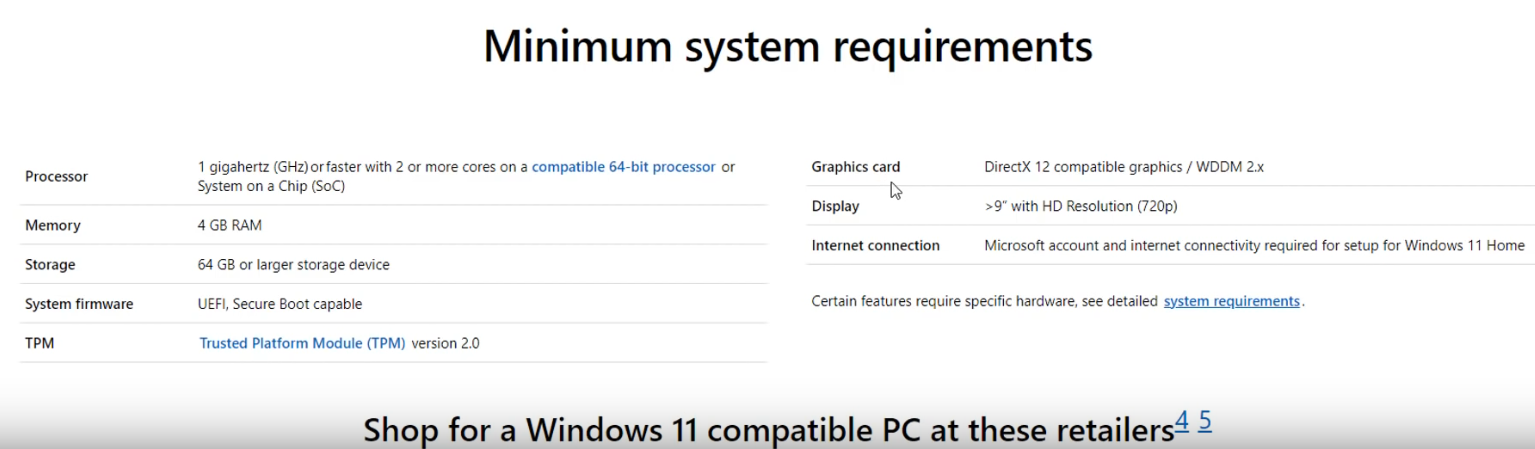
You cannot upgrade (free) to Windows 11 (Windows 10 EOL 2025) coming out later this year unless your computer had TPM v 2.0+ (all computers before 2017)
Another win for linux, we are happy 
https://www.youtube.com/watch?v=A_6wIxRC4-c
TPM video, very good:
https://www.youtube.com/watch?v=taZTeXRvwFQ
Resources:
Windows 11 Supported Intel Processors - https://docs.microsoft.com/en-us/windows...processors
Windows 11 Supported AMD Processors - https://docs.microsoft.com/en-us/windows...processors
Hello,
I am using LL 5.4
I installed syslog-ng which is a well known logging system.
After a couple of days I uninstalled it now my system does not log.
systemctl status rsyslog.service
returns:
rsyslog.service - LSB: enhanced syslogd
Loaded: loaded (/etc/init.d/rsyslog; generated)
Active: active (exited) since Tue 2021-06-22 15:03:42 EDT; 48min ago
TriggeredBy: ● syslog.socket
Docs: man ystemd-sysv-generator(8)
Process: 2553 ExecStart=/etc/init.d/rsyslog start (code=exited, status=0/SUCCESS)
On my LL4.x laptop rsyslog is running and active the same command returns:
Loaded: loaded (/lib/systemd/system/rslog.service
Acitve: active (running)
Main PID: 804 rsyslogd
CGroup: /system.slice/ryslog.service
804 /usr/sbin/rsyslogd -n
It looks like in LL 5.4 is using a script from the old init SysV system
and LL 4.x is using the new init systemd system.
Wondering how I can get rsyslog back running again.
Thanks

my area got zapped by 5 or 6 real quick power surges now i can't do anything that requires sudo priviledges. something got corrupted or deleted. i tried to reset by the instructions in the LL manual, got nothing. i tried a couple other things in command prompt and got no clues. everything i have tried requires sudo priviledges. i'm running LL3.8. it takes longer to boot up and shut down than before.
i have two questions:
1) how do i get my password back?
2)isn't it stored somewhere in the system? can i get to it?
any and all help will be appreciated many thanks in advance.

So far I haven't found a way to move tabs on my taskbar, like I can in other Ubuntu-related distros. And doing a search here for Taskbar hasn't led me to any info on this query, unless I've missed seeing it.
When I drag a tab on the taskbar, to reposition it elsewhere on the taskbar, I see a hand/arrow icon, indicating that the system is aware that I want to move the tab, but it won't drop the tab in the new position when I release it.
If the system has been programmed to recognize that activity, it seems that it would have also already implemented that capability. Somebody was obviously intending to do that or they wouldn't have implemented that much of that process. Maybe someone just forgot to implement that functionality. If so, please implement it soon, if you can.
Am I missing something here?
I first installed Windows 10. Using Disk Manager in windows I resized the C: drive to leave space for Linux.
Then I installed Linux and selected "Something else" and installed to a new partition in the newly slivered off space.
And then the installer tells me that it's not gonna write the UEFI boot image to my EFI partition for me, and that MAYBE I can do it myself later.
So how do I do that?
Hi everyone,
I'm sure this subject has been debated many times, here and elsewhere, but I need an easy, step-by-step procedure to implement it: I have installed LL (latest stable) on a Lenovo laptop, to act as file server.
Namely, I want to be able to access the content of the non-Linux part of the SSD (where a copy of Windows 10 is installed) and both USB hard drives connected to the Lenovo from another laptop, an HP, running Windows 10 from another room of the house.
I've heard of Remina and SSH and all that, but it's pretty obscure to me, especially considering that I'm used to Windows's Remote Desktop Protocol where everything is pretty straightforward.
So my question is, how can I remote-control my LL PC from a Windows 10 laptop the way I can using MS RDP? Which client and server should I use on both machines?
I am running LL 4.4 on one of my laptops. Is it ok to upgrade from ubuntu 18 to 20. I just don't know if it will break anything or not.
Thanks
I am running LL 5.4 HP Slimline Desktop
I have not used Bluetooth for anything in the past but I was just seeing if I could pair BT keyboard.
First tried the gui bluetooth apps Bluetooth Adapters and Bluetooth Manager
Bluetooth Adapters just quickly appeared then disappeared and Bluetooth manager gave
me the error msg:
"Bluez daemon is not running, blueman-manager connot continue. This
probably means that there were no BT adapters detected or BT daemon was not started"
Running the scripts from the CLI showed that No BT adapters were found.
jrm> sudo python3 blueman-adapters
blueman-adapters version 2.1.2 starting
blueman-adapters 13.02.55 ERROR Adapter:53 __init__ : No adapter(s) found
I tried to go into the machines bios to see if I could do something in there
but bios doesn't have any settings for BT
I found the thread about someone else having the same problem on a Dell machine.
Jerry posted a fix but the link was about not finding Wifi not bluetooth so I did not
think it applied.
Any help is appreciated.
I have tried numerous times to update my pc, but the following error log is always provided:
===========================
Install Updates Error log
===========================
Install Updates could not fetch the package cache information lists.
Go to https://www.linuxliteos.com/forums/ and paste the log below into a new or existing thread for assistance.

============ Log ===========

Hit:1 http://archive.canonical.com/ubuntu focal InRelease
Hit:2 http://packages.microsoft.com/repos/code stable InRelease
Hit:4 http://us.archive.ubuntu.com/ubuntu focal InRelease
Get:5 http://security.ubuntu.com/ubuntu focal-security InRelease [114 kB]
Get:6 http://us.archive.ubuntu.com/ubuntu focal-updates InRelease [114 kB]
Err:3 https://dl.bintray.com/etcher/debian stable InRelease
  403  Forbidden [IP: 3.127.93.119 443]
Get:7 http://us.archive.ubuntu.com/ubuntu focal-backports InRelease [101 kB]
Reading package lists...
E: Failed to fetch https://deb.etcher.io/dists/stable/InRelease  403  Forbidden [IP: 3.127.93.119 443]
E: The repository 'https://deb.etcher.io stable InRelease' is no longer signed.
What should I do? I followed Linux Lite's guidance