CachyOS patches, BBR v3 और ntsync के साथ mainline Linux 7.2 source से बनाया गया एक कस्टम Linux kernel। दो flavours — रोज़मर्रा के डेस्कटॉप उपयोग के लिए linuxlite और Wine तथा Proton के माध्यम से low-latency गेमिंग के लिए linuxlite-gaming।
Linux Lite kernel एक कस्टम Linux kernel है जिसे विशेष रूप से रोज़मर्रा के hardware पर डेस्कटॉप और गेमिंग उपयोग के लिए बनाया गया है। हम इसे खुद mainline Linux kernel — वर्तमान में 7.2 — kernel.org से सीधे डाउनलोड करके और आधिकारिक kernel signing keys के विरुद्ध GPG-verified करके build करते हैं, फिर popular CachyOS kernel patches का एक चुनिंदा सेट और targeted configuration tuning जोड़ते हैं ताकि box से बाहर ही एक तेज़, सुचारु, कम-latency Linux अनुभव मिले। Ubuntu 26.04 LTS kernel का configuration mainline source के ऊपर आगे लाया जाता है, इसलिए आप जिस भी driver और hardware feature पर निर्भर हैं वे सभी बरकरार रहते हैं।
दो kernel flavours उपलब्ध हैं। डिफ़ॉल्ट linuxlite kernel सामान्य डेस्कटॉप उपयोग के लिए tune किया गया है और हर Linux Lite installation इसी में boot होता है। वैकल्पिक linuxlite-gaming kernel setup के बाद दिया जाता है और इसे low input lag, smoother frame pacing और बेहतर Linux gaming performance के लिए tune किया गया है — जो इसे supported hardware पर गेमिंग के लिए सर्वश्रेष्ठ Linux kernels में से एक बनाता है। प्रत्येक सेटिंग की साथ-साथ तुलना के लिए हमारी पूरी Linux Lite kernel comparison देखें।
दो Linux Lite Kernels
linuxlite — डिफ़ॉल्ट Linux desktop kernel
मानक linuxlite kernel वह है जिसमें हर Linux Lite installation boot होता है। यह desktop Linux kernel वेब ब्राउज़िंग, ऑफिस कार्य, मीडिया प्लेबैक, सॉफ़्टवेयर विकास और सामान्य multitasking के लिए एक सुचारु, responsive रोज़मर्रा के अनुभव को प्राथमिकता देता है, जबकि laptops पर CPU overhead कम और बैटरी लाइफ अधिक रखता है।
linuxlite-gaming — वैकल्पिक low-latency Linux gaming kernel
linuxlite-gaming kernel input lag को कम करने और frame delivery को बेहतर बनाने के लिए और आगे जाता है। यह उन उपयोगकर्ताओं के लिए अनुशंसित Linux gaming kernel है जो Steam, Wine या Proton के माध्यम से नियमित रूप से गेम खेलते हैं, और ऑडियो प्रोडक्शन, वीडियो एडिटिंग और VR के लिए भी एक मज़बूत विकल्प है जहाँ timing महत्वपूर्ण है। Gaming kernel को setup के बाद किसी भी समय डिफ़ॉल्ट desktop kernel को हटाए या बदले बिना install किया जा सकता है।
Linux Lite में शामिल CachyOS Kernel Patches
दोनों Linux Lite kernels में मिलान करने वाले kernel version (वर्तमान में Linux 7.2) के लिए popular CachyOS kernel patchset का एक hand-picked subset शामिल है, जिसे स्थिरता, व्यापक hardware compatibility और वास्तविक desktop और gaming workloads पर मापनीय लाभ के लिए चुना गया है:
CachyOS patch
क्षेत्र
Linux Lite kernel में यह क्या करता है
amd-pstate
CPU
AMD P-State preferred-core scheduling — Ryzen पर सबसे तेज़ cores को performance-sensitive work भेजता है
bbr3
Network
बेहतर fairness और bandwidth estimation के साथ TCP BBR v3 congestion control
gaming-sched
Scheduler
कम latency और smoother interactive response के लिए EEVDF के ऊपर CachyOS scheduler tuning
preempt-ipi
Scheduler
Targeted IPIs का उपयोग करके lower-latency preemption, worst-case scheduling delay को कम करता है
ksm
Memory
per-process controls के साथ Kernel Samepage Merging improvements
fixes
सामान्य
Curated upstream fixes: scheduler tweaks, USB device quirks, Bluetooth (btusb), Intel i915 GT, Realtek audio (ALC269)
hdmi
Graphics
AMD GPUs (amdgpu_dm) के लिए HDMI display fixes — बेहतर mode setting और EDID handling
vesa-dsc-bpp
Graphics
AMD displays के लिए VESA Display Stream Compression bits-per-pixel improvements
snd-codecs
Audio
नए laptop और desktop audio hardware के लिए अतिरिक्त sound-codec support
t2
Hardware
Apple T2 Mac support (T2-equipped Macs पर keyboard, trackpad, audio और storage)
व्यापक cachy base patch (CachyOS-specific branding और sweeping sched/mm changes) को जानबूझकर छोड़ा गया है — यह एक stable mainstream distribution के लिए बहुत invasive है — साथ ही experimental misc/ extras और वैकल्पिक sched/ schedulers (PRJC, BORE, sched-ext) को भी। Linux 7.2 पर standalone BORE scheduler का उपयोग नहीं किया जाता; mainline EEVDF के ऊपर CachyOS gaming-sched tuning इसके बजाय interactive और gaming responsiveness प्रदान करता है। exact patch set को प्रत्येक नए mainline kernel version के साथ मिलान करने के लिए refresh किया जाता है।
दो Linux Lite Kernels को क्या अलग बनाता है
CPU Scheduler — CachyOS tuning के साथ EEVDF
Linux scheduler तय करता है कि चल रहे programs के बीच processor को कैसे share किया जाए। दोनों Linux Lite kernels आधुनिक EEVDF scheduler का उपयोग करते हैं, जो प्रत्येक program को CPU का एक fair और timely share देता है।
EEVDF के ऊपर, दोनों kernels CachyOS gaming-sched tuning के साथ preempt-ipi patch जोड़ते हैं। ये scheduler को interactive, bursty work की ओर biased करते हैं — एक desktop application जो window repaint कर रही है, या एक game जो frame process कर रहा है — और किसी waiting task के CPU मिलने से पहले worst-case delay को कम करते हैं, जिससे भारी background load के तहत भी desktop और gaming workloads snappy महसूस होते हैं।
दो Linux Lite kernels इस बात में भिन्न हैं कि scheduler चल रहे work को कितनी aggressively interrupt कर सकता है:
linuxlitedynamic preemption का उपयोग करता है, runtime पर modes switch करके throughput और responsiveness को संतुलित करता है।
linuxlite-gamingfull preemption का उपयोग करता है, जिससे kernel लगभग किसी भी task को तुरंत interrupt कर सकता है। यह किसी game या audio application को CPU time मिलने से पहले worst-case delay को कम करता है — low-latency Linux gaming में एक प्रमुख कारक।
Timer Resolution
दोनों Linux Lite kernels Ubuntu के डिफ़ॉल्ट 250 Hz की बजाय internal system timer को 1000 Hz (1000 ticks प्रति सेकंड) पर चलाते हैं। Kernel चल रहे tasks को चार गुना अधिक बार check करता है, एक program के schedule होने से पहले प्रतीक्षा का अधिकतम समय कम करता है — audio, video और gaming workloads में विशेष रूप से ध्यान देने योग्य।
Scheduler Latency Targets
linuxlite6 ms के scheduling window को target करता है — smooth multitasking के लिए पर्याप्त headroom बिना CPU cycles बर्बाद किए।
linuxlite-gaming3 ms को target करता है, window को आधा कर देता है ताकि games और interactive applications तेज़ी से respond करें।
Memory Management
RAM में ZRAM Compressed Swap
दोनों Linux Lite kernels ZRAM को enable करते हैं, जो RAM में ही एक compressed swap area बनाता है। जब system में memory कम होती है, तो कम उपयोग किए गए data को compress करके RAM में रखा जाता है बजाय धीमी disk पर लिखे। ZRAM सीमित RAM वाले पुराने PCs और laptops पर Linux Lite को responsive रखता है।
Zstd Compression के साथ ZSWAP
ZSWAP data को swap partition तक पहुँचने से पहले intercept करके पहले compress करता है। दोनों Linux Lite kernels Zstd compression को डिफ़ॉल्ट ZSWAP compressor (CONFIG_ZSWAP_COMPRESSOR_DEFAULT_ZSTD) के रूप में enable करते हैं, जो तेज़ है और उत्कृष्ट ratios प्राप्त करता है — पुराने LZO format पर एक बड़ा upgrade। Linux 7.2 एक up-to-date Zstd library के साथ आता है जो ZSWAP, ZRAM, Btrfs और squashfs में उपयोग होती है।
Kernel Samepage Merging (KSM)
दोनों Linux Lite kernels per-process prctl() controls (mainline Linux में upstreamed) के साथ Kernel Samepage Merging (KSM) को enable करते हैं। KSM processes के बीच identical memory pages को identify करता है और उन्हें एक single copy में merge करता है, RAM को free करता है। यह उस समय विशेष रूप से effective है जब एक ही application के कई instances, virtual machines, या Wine या Proton के माध्यम से Windows games चलाए जा रहे हों, जहाँ कई processes common data share करती हैं।
Transparent Huge Pages
आधुनिक processors तब अधिक कुशलता से काम करते हैं जब memory बड़े blocks में आवंटित की जाती है। दोनों Linux Lite kernels Transparent Huge Pages (THP) को enable करते हैं, जो applications से बदलाव के बिना automatically यह करता है।
linuxliteon-demand mode का उपयोग करता है — बड़े pages तब allocate होते हैं जब कोई program उन्हें madvise के माध्यम से request करता है।
linuxlite-gamingalways-on mode का उपयोग करता है — जहाँ भी संभव हो बड़े pages उपयोग किए जाते हैं, उन games को लाभ देते हुए जो बड़े textures और asset data के साथ काम करते हैं।
Networking
BBR v3 TCP Congestion Control
दोनों Linux Lite kernels में CachyOS 0002-bbr3 patch के माध्यम से BBR v3 शामिल है — Google के Bottleneck Bandwidth और Round-trip propagation time algorithm का नवीनतम संस्करण। BBR v3 पारंपरिक TCP flows के साथ links share करते समय fairer behaviour और अधिक सटीक bandwidth estimation के साथ पहले के versions पर सुधार करता है। यह connections को efficiently चलाता रहता है और Wi-Fi, mobile broadband और online gaming connections जैसे lossy links पर विशेष रूप से effective है। डिफ़ॉल्ट sysctl profile net.ipv4.tcp_congestion_control=bbr सेट करता है।
FQ Queue Discipline
Fair Queueing (FQ) को डिफ़ॉल्ट network packet scheduler (net.core.default_qdisc=fq) के रूप में सेट किया गया है। यह network traffic को connections में समान रूप से फैलाता है ताकि एक busy download अन्य traffic को starve न करे, voice chat, video conferencing और online gaming जैसे interactive use के लिए latency कम रखता है।
Storage
MQ-Deadline I/O Scheduler
दोनों Linux Lite kernels storage devices के लिए MQ-Deadline I/O scheduler (CONFIG_MQ_IOSCHED_DEADLINE) को enable करते हैं। यह write requests (जिन्हें queue किया जा सकता है) पर read requests (जिनका applications आमतौर पर सीधे इंतजार करती हैं) को प्राथमिकता देता है, और सुनिश्चित करता है कि कुछ भी बहुत लंबा इंतजार न करे। यह SSDs, NVMe drives और पारंपरिक HDDs सभी के लिए एक strong general-purpose विकल्प है।
Kyber Scheduler (केवल gaming kernel)
linuxlite-gaming kernel अतिरिक्त रूप से Kyber I/O scheduler (CONFIG_MQ_IOSCHED_KYBER=y) को enable करता है, जो gaming sessions के दौरान fast NVMe drives के लिए एक अतिरिक्त low-latency scheduler विकल्प देता है। Desktop kernel I/O path को lean रखने के लिए Kyber को disable करता है।
CPU Features
AMD P-State Preferred Core Scheduling
दोनों Linux Lite kernels में Ryzen processors पर mainline AMD P-State preferred-core scheduling शामिल है। Kernel को पता चलता है कि CPU के कौन से cores सबसे तेज़ हैं (silicon quality variation के कारण) और उन cores पर performance-sensitive work को preferentially schedule करता है। यह supported AMD systems पर single-threaded और lightly-threaded workloads में एक मापनीय सुधार देता है, Intel या पुराने AMD hardware पर कोई प्रभाव नहीं।
AES-NI / AVX-512 Cryptography
Linux 7.2 mainline crypto subsystem में optimised AES-NI और AVX-512 AES code paths के साथ आता है। Supported processors (अधिकतर आधुनिक AMD और Intel chips) पर, encryption और decryption operations — disk encryption (LUKS), network encryption (TLS, WireGuard) और filesystem checksums द्वारा उपयोग की जाती हैं — काफी तेज़ी से चलती हैं।
AMD ISP4 Webcam Driver
Mainline Linux 7.2 में AMD Image Signal Processor v4 driver शामिल है, जो आधुनिक Ryzen AI / Phoenix और नए laptops पर integrated MIPI webcam को enable करता है जिनका पहले Linux के अंतर्गत कोई working internal camera नहीं था।
HDMI और VESA DSC Display Improvements
CachyOS hdmi patch AMD GPUs (amdgpu_dm) पर HDMI mode setting और EDID handling को fix करता है, और vesa-dsc-bpp patch VESA Display Stream Compression bits-per-pixel selection को बेहतर बनाता है — मिलकर कई AMD-driven HDMI और DisplayPort monitors पर display flicker, blank screens और incorrect refresh rates को resolve करते हैं।
Utilisation Clamping (UCLAMP)
दोनों Linux Lite kernels UCLAMP को support करते हैं, जो system को individual tasks या task groups के लिए minimum और maximum CPU performance targets सेट करने देता है। UCLAMP का उपयोग compositors और audio servers द्वारा किया जाता है ताकि यह सुनिश्चित हो सके कि उन्हें हमेशा आवश्यक CPU headroom मिले, कम-power hardware पर भी।
Latency Nice
Latency Nice मानक Linux process priority system को extend करता है। Programs घोषित कर सकते हैं कि वे scheduling delays के प्रति कितने sensitive हैं, स्वतंत्र रूप से कि वे कितना CPU उपयोग करते हैं। एक compositor जो low latency-nice value पर चल रहा है, उसे low delay के साथ schedule किया जाएगा भले ही वह CPU-intensive न हो।
NUMA Balancing
Multiple processor sockets या complex memory layouts वाले systems पर, NUMA balancing स्वचालित रूप से tasks और उनके data को memory में एक-दूसरे के करीब ले जाता है। यह supported hardware पर एक no-cost improvement है और single-socket consumer systems पर कोई negative effect नहीं है।
सुरक्षा
Speculative-Execution Mitigations
desktoplinuxlite kernel CPU speculative-execution mitigations का पूरा सेट enabled रखता है, ठीक वैसे जैसे mainline Linux 7.2 उन्हें ship करता है — जिसमें vmscape vulnerability (affected Intel और AMD processors पर cross-VM/host data leakage) के लिए in-tree mitigation शामिल है।
gaminglinuxlite-gaming kernel को जानबूझकर इन CPU mitigations disabled (CONFIG_CPU_MITIGATIONS=n) के साथ build किया गया है — maximum throughput और lowest latency के लिए — यही trade-off performance- और gaming-focused kernels द्वारा किया जाता है, और यही proprietary NVIDIA driver को नए mainline kernel पर cleanly build करने की अनुमति देता है। यदि आप mitigations चाहते हैं, तो बस डिफ़ॉल्ट desktop kernel पर रहें।
Curated Upstream Fixes
CachyOS fixes patch उन छोटे upstream fixes का एक bundle है जो अभी तक stable kernel point release में नहीं उतरे हैं: scheduler tweaks (ASLR-related changes सहित), USB device quirks, Bluetooth USB (btusb) fixes, Intel i915 GT improvements और Realtek ALC269 audio codec fixes — जो सभी real hardware पर दिन-प्रतिदिन की विश्वसनीयता में सुधार करते हैं।
Kernel Updates और Security Patches
Security और stability fixes आपके system तक Linux Lite repository में publish किए गए नए kernel packages के रूप में पहुँचती हैं। जब upstream एक नया mainline point release ship करता है (उदाहरण के लिए 7.2.1, 7.2.2 और इसी तरह — जहाँ kernel.org के stable और security fixes उतरते हैं), हम उस release से refreshed CachyOS patch set के साथ Linux Lite kernel को rebuild करते हैं और दोनों flavours के लिए publish करते हैं।
Lite Kernel Manager वह तरीका है जिससे आप वे updates प्राप्त करते हैं। हर बार जब आप इसे खोलते हैं, यह repository में latest build की जाँच करता है और “Update available” banner दिखाता है जब आपका installed kernel पीछे हो; एक click आपके current flavour के लिए नया kernel (और matching headers) install करता है। पिछला kernel installed रहता है और GRUB boot menu में रहता है, इसलिए आप जरूरत पड़ने पर कभी भी rollback कर सकते हैं। दूसरे शब्दों में, Lite Kernel Manager Linux Lite kernels को install, switch और update करना संभालता है — यह केवल first-time installation तक सीमित नहीं है।
Linux Gaming और Windows Compatibility
Wine और Proton के लिए NT Synchronisation Primitives (ntsync)
Linux 7.2 में ntsync — NT synchronisation primitives — mainline kernel में शामिल है (मूल रूप से Linux 6.14 में upstreamed)। ये low-level locking और signalling mechanisms हैं जो Windows applications द्वारा उपयोग किए जाते हैं। Wine या Proton (Steam Play) के माध्यम से Windows games चलाते समय, इन operations को ऐतिहासिक रूप से userspace में emulate किया जाता था, जिससे overhead जुड़ता था। Kernel में ntsync के साथ, वे सीधे handle किए जाते हैं — CPU overhead कम करते हैं और Linux पर Windows games में frame rates और frame pacing में सुधार करते हैं। यह आज उपलब्ध Linux gaming performance के लिए सबसे बड़े single wins में से एक है, और यह दोनों Linux Lite kernels पर out of the box काम करता है।
Linux Lite Kernel के साथ शामिल Tools
linuxlite-bench — Linux Lite Kernel Benchmark
linuxlite-bench Lite Kernel Manager में Run Benchmark button के पीछे command-line benchmark है। यह real-time scheduler latency (via cyclictest from rt-tests) और GPU throughput (via glmark2) को मापता है, फिर एक confidence rating के साथ recommend करता है कि आपके hardware के लिए कौन सा Linux Lite kernel बेहतर fit है — desktop या gaming।
Results ~/.local/share/linuxlite/bench-$(uname -r).log में एक machine-readable recommendation.json के साथ save होते हैं, ताकि आप समय के साथ kernel versions में benchmarks compare कर सकें। Lite Kernel Manager से आप एक click से अपना result public Linux Lite Benchmark Database में upload कर सकते हैं।
Linux Lite Benchmark Database
Community-driven Linux Lite Benchmark Databaselinuxliteos.com/benchmark.php पर दुनिया भर से Lite Kernel Manager द्वारा upload किए गए anonymised linuxlite-bench results को aggregate करता है। यह आपको देता है:
समान machines के विरुद्ध अपने hardware के scheduler latency और GPU score की तुलना करें
Install से पहले देखें कि आपके CPU/GPU combination पर desktop या gaming kernel सामान्यतः कौन सा बेहतर perform करता है
Track करें कि Linux Lite kernel updates समय के साथ real-world performance को कैसे प्रभावित करती हैं
अपने anonymised results contribute करके समान hardware पर अन्य users की सहायता करें
Uploads में केवल kernel version, scheduler latency, GPU score और basic hardware identifiers शामिल हैं — कोई personal information नहीं भेजी जाती।
auto-profile.sh
Runtime पर kernel tuning values का matching set लागू करता है। Kernels switch करने के बाद root के रूप में चलाएं ताकि reboot किए बिना appropriate profile activate हो।
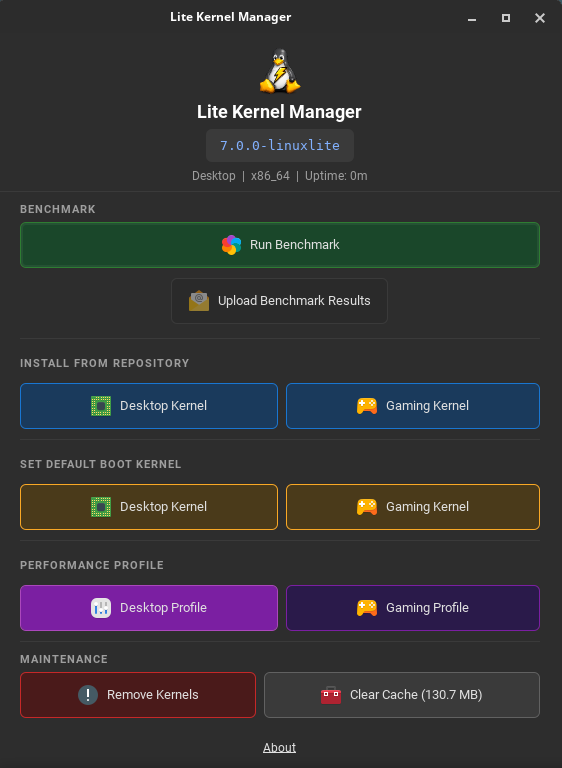
Lite Kernel Manager (lite-kernel-manager) Linux Lite kernels के प्रबंधन के लिए आधिकारिक GTK 3 graphical tool है — terminal खोले बिना अपने desktop या gaming kernel को install, switch, benchmark और tune करें। यह lite-kernel-manager के रूप में ship होता है और benchmarking के लिए अनुशंसित rt-tests और glmark2 software को integrate करता है। Privileged operations (kernel install, removal, GRUB default change) एक PolicyKit policy (com.linuxlite.kernelinstall.policy) द्वारा mediated हैं ताकि आप केवल तभी authenticate करें जब वास्तव में आवश्यक हो।
Lite Kernel Manager — Linux Lite kernel control centre, running kernel (7.2.0-linuxlite), benchmark, install, boot-default और performance-profile actions दिखा रहा है।
Lite Kernel Manager window पाँच स्पष्ट sections में organize है, प्रत्येक एक single common task को address करता है:
Benchmark — Run Benchmark आपके hardware पर linuxlite-bench scheduler-latency और GPU benchmark launch करता है, एक confidence rating के साथ अनुशंसित kernel (Desktop या Gaming) दिखाता है, और result locally save करता है। Upload Benchmark Results आपका anonymised result public Linux Lite Benchmark Database में publish करता है, community को समय के साथ hardware और kernel performance compare करने में मदद करता है।
Install From Repository — Linux Lite kernel repository (repo.linuxliteos.com) से सीधे Desktop Kernel (linuxlite) या Gaming Kernel (linuxlite-gaming) का one-click installation। Manager latest signed packages download करता है, उन्हें verify करता है, और नए kernel के लिए किसी भी third-party DKMS modules (NVIDIA, VirtualBox, आदि) को automatically rebuild करता है।
Set Default Boot Kernel — एक click से वह kernel switch करें जिसमें GRUB by default boot होता है। पहले default kernel को boot menu में fallback के रूप में preserve किया जाता है, इसलिए एक bad boot हमेशा एक reboot से ज़्यादा दूर नहीं होता।
Performance Profile — auto-profile.sh के माध्यम से runtime पर matching sysctl tuning लागू करें। Desktop Profile balanced multitasking के लिए kernel.sched_latency_ns=6 ms, min_granularity_ns=750 μs, wakeup_granularity_ns=500 μs का उपयोग करता है। Gaming Profile lower input lag और smoother frame pacing के लिए इन्हें 3 ms / 400 μs / 300 μs तक tight करता है। दोनों profiles low-latency networking के लिए tcp_congestion_control=bbr और default_qdisc=fq भी enforce करती हैं।
Maintenance — Remove Kernels पुराने Linux Lite kernels को safely uninstall करता है (running और default boot kernels को हमेशा accidental removal से बचाया जाता है)। Clear Cache current cache footprint report करता है और एक click में पिछले kernel downloads द्वारा उपयोग किए गए disk space को free करता है।
Window के शीर्ष पर एक header strip current kernel version (जैसे 7.2.0-linuxlite), active profile (Desktop या Gaming), architecture (x86_64), और system uptime दिखाता है — ताकि आप एक नज़र में confirm कर सकें कि कौन सा Linux Lite kernel और tuning वास्तव में चल रहे हैं।
Sysctl Profiles
स्थायी tuning के लिए दो configuration files प्रदान की गई हैं। उपयुक्त file को /etc/sysctl.d/ में copy करने से हर boot पर automatically profile लागू होती है।
File
Profile
99-linuxlite-desktop.conf
Balanced desktop settings
99-linuxlite-gaming.conf
Low-latency gaming settings
Linux Lite Gaming Kernel को Install कैसे करें
Linux Lite install होने के बाद, पहले login पर एक setup window दिखती है जो gaming kernel install करने की पेशकश करती है। Install Gaming Kernel पर click करने से सब कुछ automatically handle हो जाता है:
linuxlite-gaming kernel packages install होते हैं
नए kernel के लिए किसी भी third-party drivers (NVIDIA, VirtualBox, आदि) को rebuild किया जाता है
GRUB boot menu update होता है
डिफ़ॉल्ट kernel नहीं बदला जाता और न ही हटाया जाता। यदि gaming kernel कभी कोई समस्या पैदा करे, तो बस reboot करें और boot menu से standard linuxlite kernel चुनें — सब कुछ ठीक वैसे ही काम करता रहेगा जैसे पहले था।
किसी भी समय manually Linux Lite kernel install या switch करने के लिए, installer चलाएं (यह auto-escalate होकर root बनता है और यदि कोई flavour नहीं दिया गया तो interactively prompt करता है):
Installer सुनिश्चित करता है कि existing kernel और उसके सभी DKMS modules को कभी नहीं छुआ जाता, GRUB default boot entry नहीं बदली जाती, और DKMS modules केवल नए kernel के लिए rebuild होते हैं।
सुरक्षा और Rollback
Boot menu default कभी automatically नहीं बदला जाता। Original kernel हमेशा fallback रहता है।
Third-party drivers (DKMS modules) नए kernel के लिए स्वतंत्र रूप से rebuild होते हैं। Original kernel के drivers को नहीं छुआ जाता।
यदि setup के दौरान gaming kernel को अस्वीकार किया जाता है, तो इसे दोबारा offer नहीं किया जाएगा। इसे फिर भी Lite Kernel Manager के माध्यम से किसी भी समय manually install किया जा सकता है।