

Anuncio de lanzamiento
Linux Lite 5.4 RC1 ya está disponible para pruebas. Consulte los detalles a continuación.

Cambios:
Nueva sección 'Instalación de software: desde una terminal usando APT' en el Manual de ayuda:

Tema de iconos Papirus actualizado

10 nuevos fondos de pantalla de los cuales 6 son de nuestro artista residente [member=5059]whateverthing[/member]

Además de muchos otros ajustes y cambios.
Tema de ventana: Adapta
Tema de iconos: Papirus
Fuente: Roboto Regular
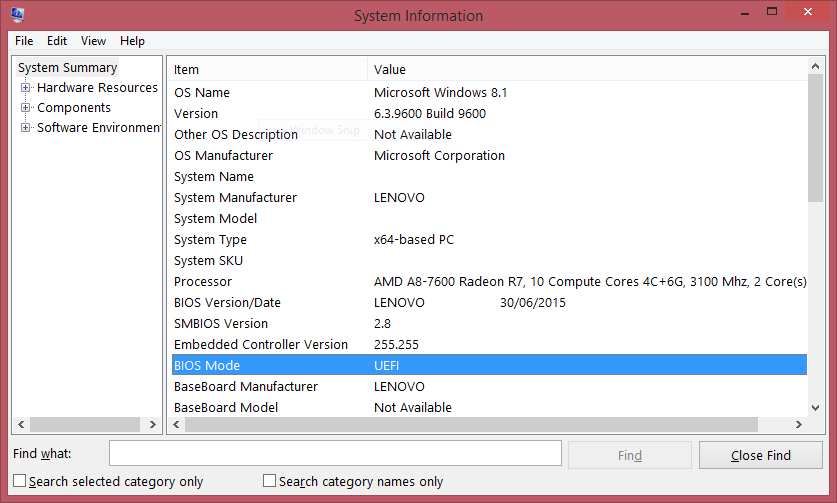
¿Cómo sé si mi PC con Windows tiene UEFI?
En la búsqueda de Windows, escriba msinfo o msinfo32e inicie la aplicación de escritorio denominada Información del sistema. Busque el elemento del modo BIOS, y si el valor es UEFI, entonces tiene el firmware UEFI. Si dice BIOS Modo heredado, entonces ese es el firmware que está ejecutando.
Se admite el arranque seguro, pero a menos que sepa exactamente cómo manejarlo, puede ser un dolor de cabeza y causante de molestias no deseadas, por lo que se recomienda deshabilitar el arranque seguro para evitar este tipo de inconvenientes.
Algunos fragmentos útiles del Manual de ayuda:
Quote:UEFI
Según How-To-Geek , "El BIOS pronto estará muerto: Intel ha anunciado planes para reemplazarlo por completo con UEFI en todos sus conjuntos de chips para 2020. El BIOS tradicional todavía tiene serias limitaciones. Solo puede arrancar desde unidades de 2,1 TB o menos. Las unidades de 3 TB ahora son comunes y una computadora con BIOS no puede arrancar desde ellas. Esa limitación se debe a la forma en que funciona el sistema de registro de arranque maestro del BIOS. UEFI reemplaza el BIOS tradicional en las PC. No hay forma de cambiar de BIOS a UEFI en una PC existente".
Quote:Arranque seguro
Linux Lite recomienda que desactive el Arranque seguro en su BIOS. Esto le ahorrará potencialmente muchos dolores de cabeza durante el uso de su sistema. Linux Lite se ejecutará con el Arranque seguro habilitado, pero le recomendamos que no lo haga. Debe tener en cuenta que el arranque seguro se considera una función de seguridad y se implementó para dificultar que elementos como el ransomware se apoderen de su PC.
Desactivación del arranque seguro: sugerencias
Hay muchas maneras de hacer esto. Uno de estos debería funcionar para su sistema:
- En Windows: mantenga presionada la tecla Mayús, haga clic en el icono de encendido en su menú, haga clic en Reiniciar, mantenga presionada la tecla Mayús todo el tiempo. Suelte la tecla Shift una vez que llegue a las opciones de recuperación. Vaya a Solucionar problemas, Opciones avanzadas, Configuración de firmware UEFI, Reiniciar. Luego estará en su BIOS, busque Seguridad, o Opciones avanzadas o de arranque y encontrará Arranque seguro, deshabilítelo. Salga de su BIOS guardando la configuración.
- Encienda su PC y acceda al menú de su BIOS. Puede hacer esto presionando una tecla durante la secuencia de arranque, por ejemplo. F1, F2, F12 o Esc. Busque la configuración de Arranque seguro, configúrela en Desactivado. El arranque seguro suele estar en la pestaña Seguridad, la pestaña Arranque o la pestaña Autenticación. Guarde los cambios y salga de su BIOS.
- En Windows: al hacer clic en el ícono de ajustes en el menú Inicio, accederá a Configuración. En Configuración, elija Actualización y seguridad. Seleccione Recuperación en el menú de la izquierda y podrá ver Inicio avanzado en el lado derecho. Haga clic en Reiniciar ahora en la opción Inicio avanzado. El ordenador se reiniciará en el menú de recuperación. Seleccione Solucionar problemas, Opciones avanzadas, Configuración de firmware UEFI. Reiniciar.
Enlace de soporte UEFI - https://www.linuxliteos.com/forums/uefi-secure-boot/
Detalles:
Kernel: 5.4.0-66 (kernels personalizados también disponibles a través de nuestro Repositorio para versiones 3.13 - 5.11)
Firefox: 85.0.1
Thunderbird: 78.10.0
LibreOffice: 6.4.6.2
VLC: 3.0.9.2
Gimp: 2.10.18
Base: 20.04.2
Problemas conocidos:
No hay un mensaje para expulsar los medios al final de la instalación heredada, el mensaje está disponible en el final de la instalación de UEFI.
Notas de la versión: no funciona en la primera diapositiva del instalador.
Iconos de escritorio: solo soporte en inglés.
Grub: mantener presionada la tecla Mayús mientras se inicia en modo UEFI no abre el menú Grub (funciona en modo Heredado), esperando la corrección de Ubuntu.
El menú de Grub muestra Linux Lite como 'Ubuntu'. Después de instalar Linux Lite, puede cambiar Grub para que muestre 'Linux Lite':
- Edite el archivo /etc/default/grub como administrador.
- Comentar: GRUB_DISTRIBUTOR = `lsb_release -i -s 2> / dev / null || echo Debian` y dejar GRUB_DISTRIBUTOR = 'Linux Lite' sin comentar.
- Debería verse así:
GRUB_DISTRIBUTOR = 'Linux Lite'
# GRUB_DISTRIBUTOR = `lsb_release -i -s 2> / dev / null || echo Debian`sudo update-grubNo hay actualización hacia o desde versiones de prueba. Estas versiones son solo para pruebas y no se recomienda ejecutarlas como su sistema operativo principal o secundario.
Descargas:
HTTPS:
Descarga 64bit desde aquí -Linux Lite 5.4 RC1 de 64 bits
MD5SUM: cb47d085d121695d45ec1928d572f2a6
SHA256: f9e11f574712b6d972334b992d585527f3800a0ca7b6a1a1858315e65fea0599
Tamaño: 1,4 GB (DVD, USB)
TORRENT: (La forma más rápida para descargar)
Torrent 64 bits aquí - Linux-lite-5,4-rc1-64bit.iso.torrent
Hash: 044f49112ea936c83534d290d595df16fb1880a7
Tamaño: 1.4Gb (DVD, USB)
Live USB/DVD/VirtualBox/Vmware:
El inicio de sesión es automático, no se requieren credenciales. La imagen se puede escribir en una memoria USB de 2 GB o más, o en un DVD grabable. Alternativamente, puede usar el comando dd:
sudo dd if = linux-lite-5.4-rc1-64bit.iso of = / dev / sdx bs = 4Mdonde 'X' es la letra de su memoria USB. En Linux, para encontrar la letra de su memoria USB, abra una terminal y escriba:
df -hSe recomienda https://www.balena.io/etcher/ o https://rufus.ie/ para la creación del medio de instalación USB.
En nuestras pruebas, Etcher y Rufus (solo para Windows) han demostrado ser los más confiables. Etcher está disponible para Mac, Windows y Linux.
Si se bloquea la pantalla durante el modo en vivo, escriba Linux como usuario y haga clic en el botón Iniciar sesión (no requiere contraseña)
Requisitos Mínimos:
Procesador de 1 GHz+
768 MB de ram+
8gb HDD/SD+
Pantalla VGA capaz de una resolución de 1024x768
Unidad de DVD o dispositivo USB.
Requisitos Recomendados:
Procesador de 1,5 GHz+
1024 MB de RAM+
HDD / SSD de 20 GB + Pantalla
VGA, DVI o HDMI con una resolución de 1366x768 +
Unidad de DVD o dispositivo USB.
El Inicio de sesión en el escritorio es automático.
Lo primero que DEBE hacer después de una nueva instalación de Linux Lite es ejecutar Menú, Favoritos, Instalar actualizaciones.
Como se trata de una versión de prueba, es probable que haya errores, etc. Por favor, ayude a que la versión final sea estable participando en esta versión de prueba. Informe cualquier error y comentarios en este hilo.
Gracias
Jerry y el equipo.

Hi everyone! Hope you are all having a nice day 
I quite often reinstall my OS or install it on some older machines, so I thought it would be cool to automatize a lot of post installation stuff in a bash script(e.g. installing programs, customizing desktop). I'm relatively new to Linux, so it may be a stupid question, but there are 2 problems I don't know how to solve:
I found that installing software from Lite Software is easier and more convenient than downloading .deb files or adding repos manually. Can I somehow install software from Lite Software using only the terminal?
I usually customize the desktop panel, but I didn't found any resource about how to do that in terminal (e.g. setting panel size, font, adding new element, etc.).
Thank you for your replies in advance!
I finally got my new gaming laptop (Asus zephyrus m15) and after less than 5 minutes remembered why I despise windows. After a bit I got LL 5.2 installed. Thank you for making the needed drivers for the nvidia graphics card so easy to deal with. Looking forward to remaining with LL for a permanent OS.

Release Announcement
Linux Lite 5.4 RC1 is now available for testing. See below for details.
Changes:
New 'Installing Software - From a Terminal using APT' section for the Help Manual:
Updated Papirus icon theme
10 new Wallpapers of which 6 are from our resident artist [member=5059]whateverthing[/member]
Plus many other tweaks and changes.
Window Theme: Adapta
Icon Theme: Papirus
Font: Roboto Regular
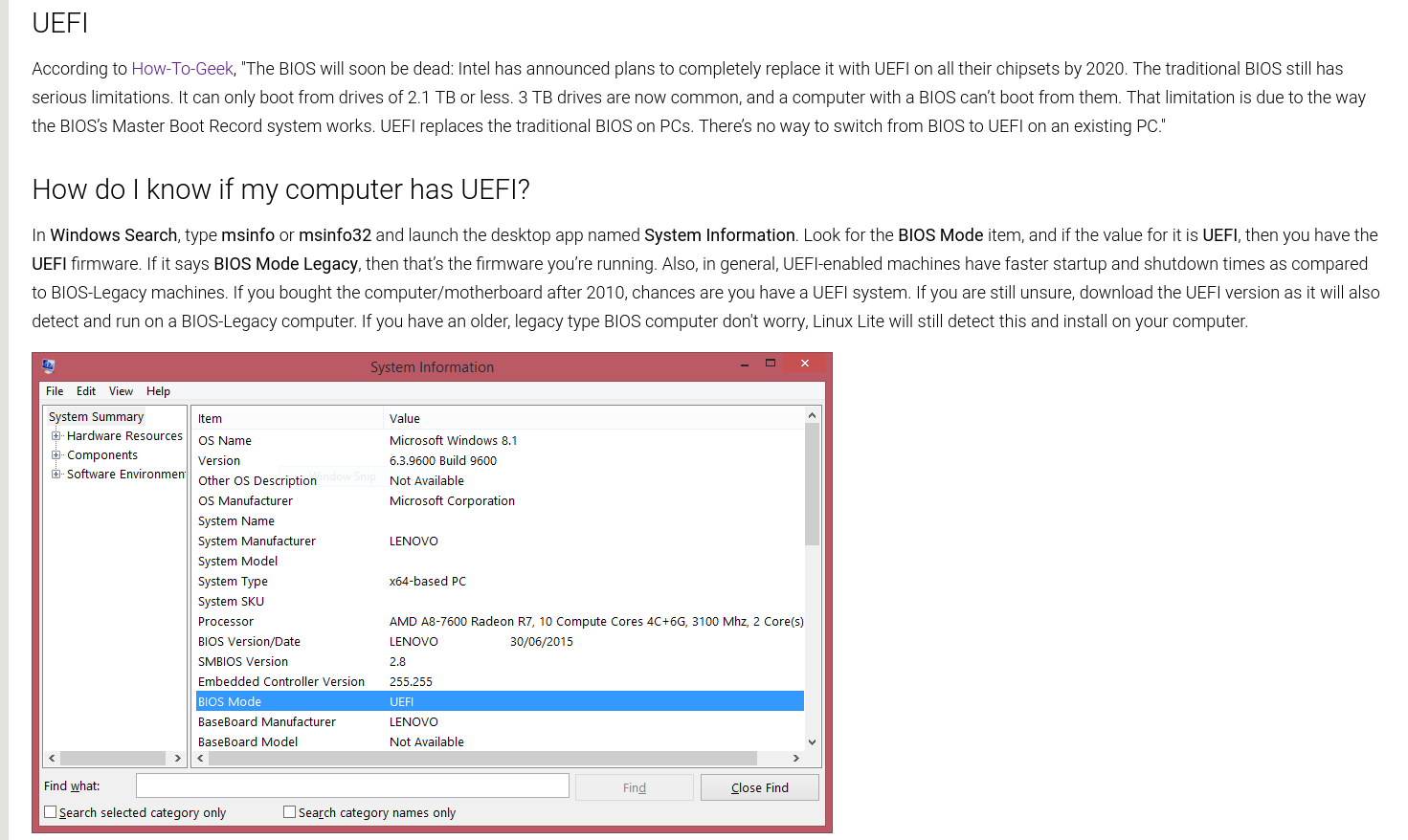
How do I know if my Windows PC has UEFI?
In Windows Search, type msinfo or msinfo32 and launch the desktop app named System Information. Look for the BIOS Mode item, and if the value for it is UEFI, then you have the UEFI firmware. If it says BIOS Mode Legacy, then that’s the firmware you’re running.
Secure Boot is supported, but unless you know exactly how to handle it, it is a P.I.T.A. at best so I am going to say...you must disable Secure Boot to enable stress free computing.
Some helpful snippets from the latest Help Manual:

UEFI Support link - https://www.linuxliteos.com/forums/uefi-secure-boot/
Details:
Kernel: 5.4.0-66 ( custom kernels also available via our Repository for versions 3.13 - 5.11 )
Firefox: 85.0.1
Thunderbird: 78.10.0
LibreOffice: 6.4.6.2
VLC: 3.0.9.2
Gimp: 2.10.18
Base: 20.04.2
Known Issues:
No prompt to eject Media at the end of the Legacy install, prompt is available at the end of the UEFI install.
Release Notes - not working on first installer slide.
Desktop icons - English support only.
Grub - holding shift down whilst booting in UEFI mode does not bring up the Grub menu (works in Legacy mode), waiting for Ubuntu fix.
Grub menu shows Linux Lite as 'Ubuntu'. After you install Linux Lite, you can change Grub to show 'Linux Lite':
- Open /etc/default/grub as Administrator.
- Comment out: GRUB_DISTRIBUTOR=`lsb_release -i -s 2> /dev/null || echo Debian` and leave GRUB_DISTRIBUTOR='Linux Lite' uncommented.
- Should look like:
GRUB_DISTRIBUTOR='Linux Lite'
#GRUB_DISTRIBUTOR=`lsb_release -i -s 2> /dev/null || echo Debian`
- sudo update-grub
You tell me.
There is no upgrade to or from RC releases. RC releases are for testing only and it is not recommended to run them as your main or secondary operating system.
Downloads:
HTTPS:
Download 64bit from here - Linux Lite 5.4 RC1 64bit
MD5SUM: cb47d085d121695d45ec1928d572f2a6
SHA256: f9e11f574712b6d972334b992d585527f3800a0ca7b6a1a1858315e65fea0599
Size: 1.4Gb (DVD, USB)
TORRENT: (Fastest way to download the RC)
64bit Torrent from here - linux-lite-5.4-rc1-64bit.iso.torrent
Hash: 044f49112ea936c83534d290d595df16fb1880a7
Size: 1.4Gb (DVD, USB)
Live USB/DVD/VirtualBox/Vmware:
Login is automatic, no credentials are required. The image can be written to a 2gb or larger USB stick, or a writable DVD. Alternatively, you can use the dd command: sudo dd if=linux-lite-5.4-rc1-64bit.iso of=/dev/sdx bs=4M where 'x' is the letter of your usb stick. In linux to find out the letter of your usb stick, open a terminal and type: df -h It is usually listed as 'media' or similar. Please see the built in Help Manual if you require a more detailed explanation of this procedure.
A good, simple point and click USB ISO burner is https://www.balena.io/etcher/ or https://rufus.ie/
In our testing, Etcher and Rufus (for Windows only) have proven to be the most reliable. Etcher is available for Mac, Windows & Linux.
If the screen locks during Live mode, type linux into the user box and click on the Login button (no password required)
Minimum Recommended Specs:
1Ghz processor
768mb ram
8gb HDD/SD
VGA screen capable of 1024x768 resolution
DVD drive or USB port for the ISO image
Preferred Specs:
1.5GHz processor+
1024mb ram+
20gb HDD/SSD+
VGA, DVI or HDMI screen capable of 1366x768 resolution+
DVD drive or USB port for the ISO image
Login to the live desktop is automatic.
The first thing you MUST do after a fresh install of Linux Lite is run Menu, Favorites, Install Updates.
As this is a RC release, there are bound to be bugs etc. Please help make the final stable for other people by participating in this RC. Please report any bugs and feedback in this thread.
Thank you
Jerry and the team.
Sometimes when I press Alt + Tab to switch between open windows the display zooms in, almost like a magnifier app.
The display then pans around with the cursor.
The only way to fix it is to restart.
Is this a known bug or have I accidentally pressed some magic key combo for turning on the magnifier?

System is LL 4.8. After updating today and then rebooting, the machine stuck in the spinning wheel phase. I finally got the Grub screen after messing with various options, but nothing I tried would let me boot so I restored the system using a 12 day old Clonezilla image, which, LUCKILY, worked.
But now I don't dare update the system again. What happened?
How do i manually set up system wide proxy settings?
Thank you.
Hello,
I have the layout set to Portuguese (standard) and the keyboard is not mapped correctly.
I have to go into the Keyboard settings, change to a different layout and then change back to Portuguese to get the correct layout.
I have to do this every time I boot to get the correct layout. Can someone please tell me what I need to do to get this to stick?
After a failed update I restarted my PC and end up stuck at the login screen, but the system was configured to start without the login screen, and so it did until I had this problem.
When I type my password the screen only gets dark for a moment and I get redirected to the login screen again. (Yes I'm sure that I'm typing the right password, I've already tested with a wrong one).
I have some work that I really can't lose on it, so just reinstaling it is not an option, unless I could access and copy those files to a flash drive, but if I could just solve this problem it will be perfect.
I'm a rookie when it comes to linux, so any advice will be greatly apprecieted.